
A fake CAPTCHA scam uses a familiar verification screen to persuade you to run a command on your computer. If a page asks you to open Windows Run, PowerShell or Terminal and paste something to prove you are human, stop. That request is a warning sign of ClickFix, a social engineering technique used to deliver malware.
The important clue is the action requested. A convincing logo, a working website and a reassuring “verification successful” message do not make an operating-system command safe.
This guide explains how to recognize the trap and what to do at each stage, including when you have already run the command.
Already executed something? Disconnect the affected computer from the network and contact your IT team if it is a work device. Use a separate, trusted device to secure your accounts. Go directly to the recovery checklist.
In this guide
- What is a fake CAPTCHA scam?
- Real vs fake CAPTCHA: warning signs
- How the attack works
- What changed with TerminalFix?
- What to do after a suspicious prompt
- Scanning with Microsoft Defender
- Prevention for home and work
- Frequently asked questions
What is a fake CAPTCHA scam?
A CAPTCHA or browser challenge helps a website distinguish legitimate visitors from automated traffic. A fake CAPTCHA imitates that process but adds a different objective: getting the visitor to execute code outside the browser.
ClickFix is the delivery technique, rather than the name of one specific virus. The pretext can be human verification, a broken page or another technical problem. Microsoft has documented campaigns reaching users through phishing, malicious advertising and compromised websites, with Windows and macOS among the targeted platforms. Different campaigns can deliver different malware. [1]
That distinction matters when asking how to remove a “CAPTCHA virus.” There is no single cleanup procedure that identifies every payload by that name. Your response should depend on what you did and what the command may have launched.
Real vs fake CAPTCHA: the warning signs
The simplest rule is to watch for a browser check that asks you to run a system command. New Zealand’s Own Your Online service specifically warns about fraudulent verification pages that request keyboard commands, copied content or sensitive information. [2]
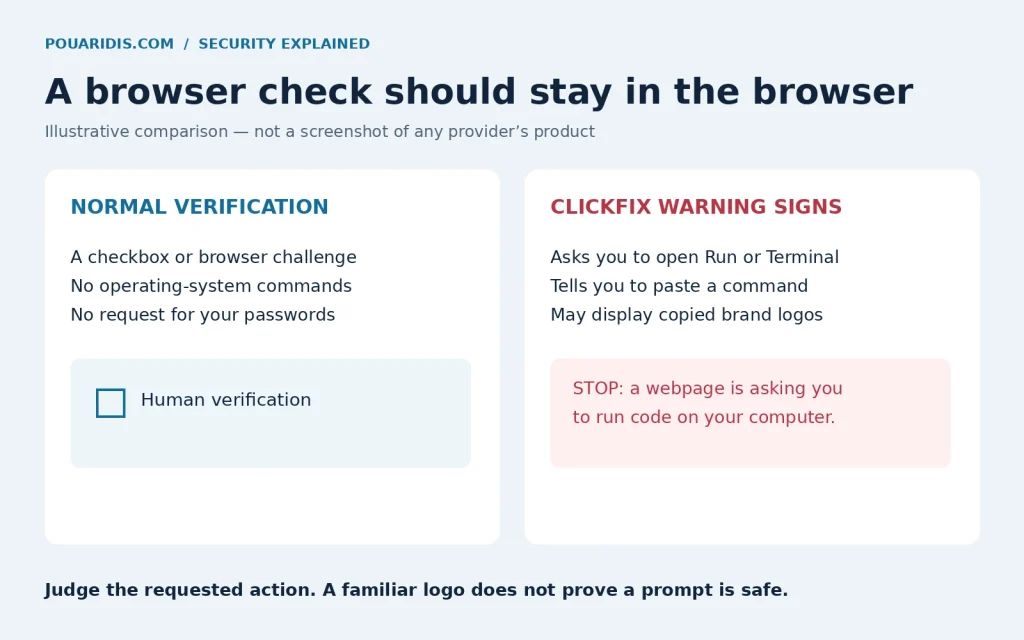
| What the page asks | How to interpret it |
|---|---|
| Complete a browser challenge or checkbox | Consistent with verification, though appearance alone cannot establish trust. |
| Open Windows Run, PowerShell or Terminal | A strong ClickFix warning sign in this context. |
| Paste and execute a “verification” command | Stop: you are being asked to run code on your device. |
| Disable antivirus or ignore a security warning | Do not comply to access a page. |
| Provide a password or recovery code to finish a CAPTCHA | Leave the page; those secrets do not belong in a CAPTCHA. |
Cloudflare’s documentation describes Turnstile as a browser-based verification system that can operate without interaction or display a checkbox when necessary. Opening a shell is not part of that documented visitor experience. [3]
A broken challenge is not automatically malicious. Browser compatibility, extensions or network restrictions can cause genuine verification problems. Try another supported browser or contact the website through a known address; do not accept an unexpected command as a repair. [4]
How a ClickFix attack works
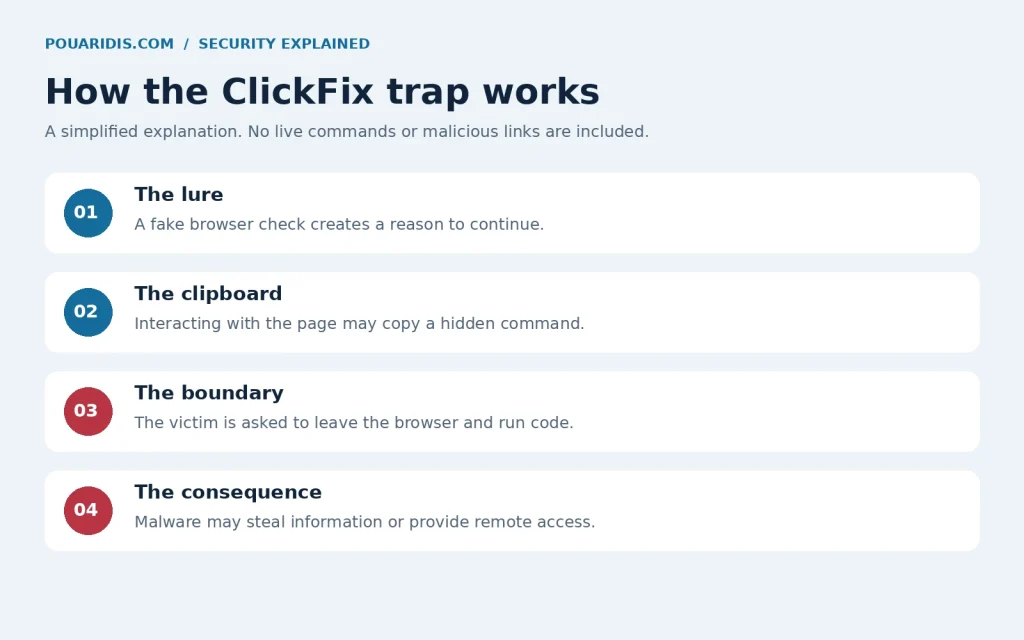
The deception moves through a few recognizable stages:
- A page creates a reason to continue. It claims verification is required before you can view the content.
- Interaction may populate the clipboard. A click can copy a command that is different from the reassuring text you see.
- The instructions cross a boundary. You are told to open a system tool and paste the clipboard contents.
- Execution enables the payload. The command can retrieve and launch malware under a verification pretext.
The crucial transition is from viewing website content to granting that content execution on your computer. A short command can initiate a longer chain, so its visible length tells you little about its impact. [1]
TerminalFix: why a fake check can threaten a whole network
In an August 28, 2026 report, Microsoft described a TerminalFix campaign using compromised websites and fake Cloudflare verification overlays. Users were directed to Windows Terminal or PowerShell. The subsequent intrusion established persistence, investigated the organization’s environment and deployed a reverse tunnel through the affected device. [5]
A reverse tunnel can provide an attacker with access through a computer inside the network. This observed campaign therefore went beyond a simple credential-stealing lure. It does not mean every fake CAPTCHA installs the same tools, or that every infected device experiences the same outcome.
For a work computer, the practical implication is immediate escalation. Microsoft recommends investigating affected devices as possible network access points and checking for credential exposure and movement to other systems. Its report distinguishes the capabilities it observed from possible later attacker actions. [5]
What to do if you interacted with a fake CAPTCHA
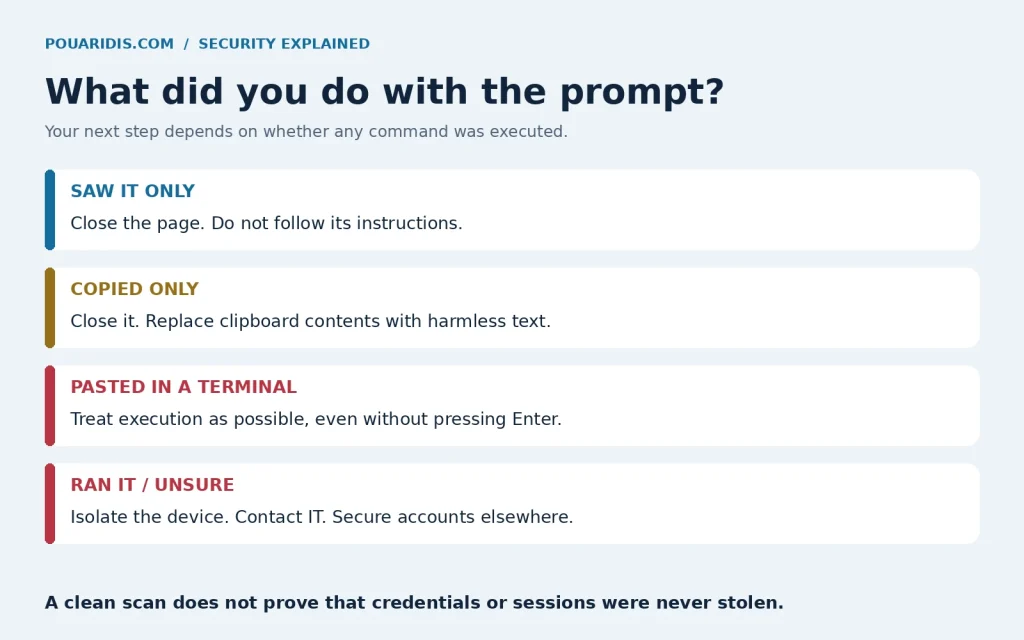
Start by deciding which description matches your situation. If you cannot tell whether execution occurred, use the more cautious response.
You saw the prompt but did not follow it
Close the tab. Do not return to test the instructions. Seeing this particular lure is not, by itself, evidence that its command ran. If your browser downloaded anything, do not open it. Investigate separate security alerts or unusual behavior rather than assuming the screen alone proves infection.
You copied something but did not paste or run it
Close the page and replace the clipboard contents by copying a harmless word from a trusted document. If clipboard history or synchronization is enabled, clear relevant entries there too. Do not paste the suspicious content into a command prompt to inspect it.
Copying a command is not the same as executing it. Nevertheless, any other action—opening a download, entering credentials or approving an unexpected request—needs its own assessment.
You pasted into Run, PowerShell or Terminal
If you are certain the text is still unexecuted in the Run dialog, cancel it. If you pasted into a terminal, do not assume you are safe because you never pressed Enter: pasted line breaks or terminal behavior can cause execution. When uncertain, follow the steps below.
You ran the command, or execution is possible
- Isolate the computer. Turn off Wi-Fi and unplug Ethernet. Do not continue signing in to email, banking or other sensitive services on it. Swiss NCSC guidance recommends network isolation and changing important passwords from a known-clean device. [6]
- Contact your IT or security team for a managed device. Describe the page, the approximate time and what you clicked or pasted. Follow their instructions before wiping the machine or attempting cleanup. Do not reproduce the command to demonstrate it.
- Secure accounts from another trusted device. Prioritize email, your password manager, work accounts and financial services. Change affected passwords, revoke active sessions and access tokens where supported, and review MFA enrollment and account activity. Canada’s Cyber Centre includes session and token revocation in its malware response guidance. [7]
- Arrange device investigation and recovery. Run trusted security tools or follow your organization’s incident response process. Do not obtain a “cleaner” from the suspicious page.
- Escalate financial or account misuse. Contact the relevant provider through its official app or a separately verified contact channel.
Keep a written timeline. If the suspicious URL or command is already available, share it privately with the responder without opening or running it again. Avoid posting it publicly, where it could expose personal information or direct others to the attack.
Why changing passwords may not be enough
Some malware steals authenticated session cookies. The FBI has warned that stolen “remember me” cookies can let criminals access email without re-entering the password or completing MFA. [8]
Use the service’s session-management controls as well as changing passwords. Clearing cookies in your own browser does not necessarily invalidate a copy already stolen by an attacker. Review recovery addresses, forwarding rules and unfamiliar connected applications, especially in email accounts.
How to scan with Microsoft Defender on Windows 11
For a personal Windows computer using Microsoft Defender Antivirus, the Windows Security app provides several scan options. For a work device, let IT decide when and how to scan.
- Open Windows Security from the Start menu.
- Select Virus & threat protection.
- Open Scan options and choose Full scan.
- Follow the tool’s remediation instructions and review Protection history.
- If appropriate, run Microsoft Defender Antivirus (offline scan) from Scan options. Save your work first: the computer restarts, scans outside the normal Windows session and restarts again.
These options and restart behavior are described in Microsoft’s Windows Security guidance [9]. Labels and availability can vary with your security configuration. If another antivirus manages protection, follow its documented process.
A clean scan does not establish that nothing was stolen. Continue account recovery after suspected execution. If an infection cannot be reliably removed, rebuilding the computer may be necessary. UK NCSC guidance recommends reinstalling the operating system when antivirus cannot clean up the infection. [10]
How to protect yourself and your organization
Make this a habit: when a webpage asks you to run a command, pause and verify the request independently. A copied logo and a confident explanation are easy to manufacture.
- Keep the operating system, browser and security software updated.
- Use unique passwords and MFA, while recognizing that endpoint compromise still requires a response.
- Leave protective warnings enabled. Do not weaken them to satisfy a verification prompt.
- For teams, teach this specific scenario with a safe example and make reporting easy.
- Have administrators assess application controls and restrictions on unnecessary command tools against real business needs.
Does a VPN protect against ClickFix?
A VPN tunnel does not make a command safe or remove malware you execute. Filtering features may block some known destinations, but that is different from preventing this social engineering step. For the underlying privacy boundaries, read how a VPN works and where its protection ends.
If you run a WordPress website
A familiar domain can itself be compromised. New Zealand’s NCSC warns that ClickFix pages can appear on compromised WordPress sites and may hide their behavior from scanners. Removing the visible overlay alone is insufficient: investigate the entry point and persistence, update the site, remove unused components and review administrative access. Get specialist help when necessary. [11]
Network security has other boundaries too. My UPnP security guide explains a separate router setting worth understanding; changing it does not replace responding to an infected computer.
Frequently asked questions
Does a real CAPTCHA ask me to use Windows Run?
No. Treat a human-verification prompt that asks you to paste and execute a command in Run, PowerShell or Terminal as a ClickFix warning sign.
Can ClickFix affect a Mac?
Yes. Microsoft has documented ClickFix targeting macOS as well as Windows. A request to paste a verification command into Terminal deserves the same caution.
Am I infected if I only clicked the checkbox?
A click may copy content to your clipboard without executing the system command. It does not, on its own, establish infection. Consider any downloads, credentials entered, security alerts and subsequent actions.
Will closing the browser remove malware?
Closing the page stops further interaction with the prompt. It does not remove malware that has already executed on the computer.
Can I trust a successful antivirus scan after running the command?
A scan is useful evidence, but it does not prove that no information was stolen or that every component was removed. Complete account recovery and seek help if compromise remains possible.
Remember the boundary: human verification belongs in the browser. If a page asks you to run code on your computer, stop and verify through a trusted channel.
If you’ve found my post helpful, I’d love it if you bought me a coffee! ☕😊

Sources and further reading
- Microsoft: Think before you Click(Fix) — August 21, 2025.
- Own Your Online: ClickFix using websites to spread malware — September 2, 2026.
- Cloudflare: Turnstile.
- Cloudflare: Challenge solve issues.
- Microsoft: TerminalFix campaign — August 28, 2026.
- Swiss NCSC: Device infected.
- Canadian Centre for Cyber Security: Protect your organization from malware.
- FBI: Stolen cookies and MFA — October 30, 2024.
- Microsoft Support: Virus and threat protection.
- UK NCSC: Recover an infected device.
- New Zealand NCSC: Compromised websites serving ClickFix — September 2, 2026.