

Updated: October 2, 2026
Affiliate disclosure: This article contains affiliate links to Proton VPN. If you purchase through one of these links, I may earn a commission.
Open your VPN settings and you may find a list of names that do little to explain themselves: WireGuard, OpenVPN, IKEv2, perhaps a Stealth option, and an automatic mode. Which one should you actually use?
My recommendation: start with your VPN app’s automatic mode. If you want to choose manually, try WireGuard first for everyday use, keep OpenVPN as a compatibility option, and use an obfuscated protocol when ordinary VPN connections are blocked. IKEv2/IPsec remains a useful choice where your device and VPN service support it.
This guide explains the differences, what they mean in practice, and how to choose without getting lost in encryption terminology. These are recommendations based on protocol design and official documentation, not results from a hands-on benchmark.
VPN protocols compared: the quick answer
There is no universal speed winner on every device and network. Treat this table as a starting point for testing, not a performance leaderboard.
| Option | When to try it | Main consideration |
|---|---|---|
| Automatic / Smart mode | Everyday use without manual configuration | The app chooses among supported options; behavior varies by provider. |
| WireGuard | General browsing, streaming, gaming, and mobile use | Standard WireGuard uses UDP; restrictive networks may block it. |
| OpenVPN UDP | A configurable alternative, including compatible routers | Performance depends on hardware, software, and configuration. |
| OpenVPN TCP | Networks where UDP connections fail | TCP inside TCP can hurt performance, especially with packet loss. |
| IKEv2/IPsec | Supported devices and managed VPN deployments | MOBIKE can help with network changes; both ends need support. |
| Stealth / obfuscation | Networks that identify and block normal VPN traffic | Provider-specific behavior; no guarantee against every block. |
| L2TP/IPsec | Existing systems requiring legacy compatibility | Not my first choice for a new setup. |
| PPTP | No recommended use for protecting sensitive traffic | Obsolete security; choose a modern alternative. |
What is a VPN protocol?
A VPN protocol is the set of rules your device and a VPN server use to establish and carry a VPN connection. Those rules determine how the peers authenticate, establish keys, and transport protected traffic.
The protocol is only one part of the service. The application manages things such as connecting to an account, selecting servers, and exposing settings. The provider operates the infrastructure. A strong protocol does not, by itself, tell you what a provider logs or whether its application handles connection failures safely.
Think of choosing a protocol as choosing how the connection works. Choosing a provider means deciding who operates the other end.
How a VPN tunnel works—and where it ends
In a typical consumer VPN connection, the application routes selected traffic into a virtual network interface. The VPN protects that traffic and carries it to the server, where the VPN layer is removed and the traffic is forwarded toward its destination.

The VPN tunnel ends at the VPN server. HTTPS is a separate layer that can protect browser traffic all the way to the website. Removing the VPN layer does not remove the website’s HTTPS encryption.
A local network operator can still observe that your device is communicating with a VPN endpoint, along with timing and traffic volume. The VPN does not make you anonymous to a website where you sign in. Cookies, account activity, and other tracking mechanisms remain relevant.
Control traffic versus data traffic
There are two useful concepts: messages that establish and maintain a secure connection, and messages carrying your application traffic. In TLS-mode OpenVPN, these are explicitly described as the control channel and data channel. Other protocols organize their handshakes and traffic differently; they do not all implement OpenVPN’s channel structure. See the OpenVPN protocol documentation.
What packet encapsulation means
Encapsulation means carrying one packet inside another. For a simplified IP-tunnel example, your original packet is protected inside a VPN message, while an outer header lets the network deliver that message to the VPN server. At the server, the outer packaging and VPN protection are removed.
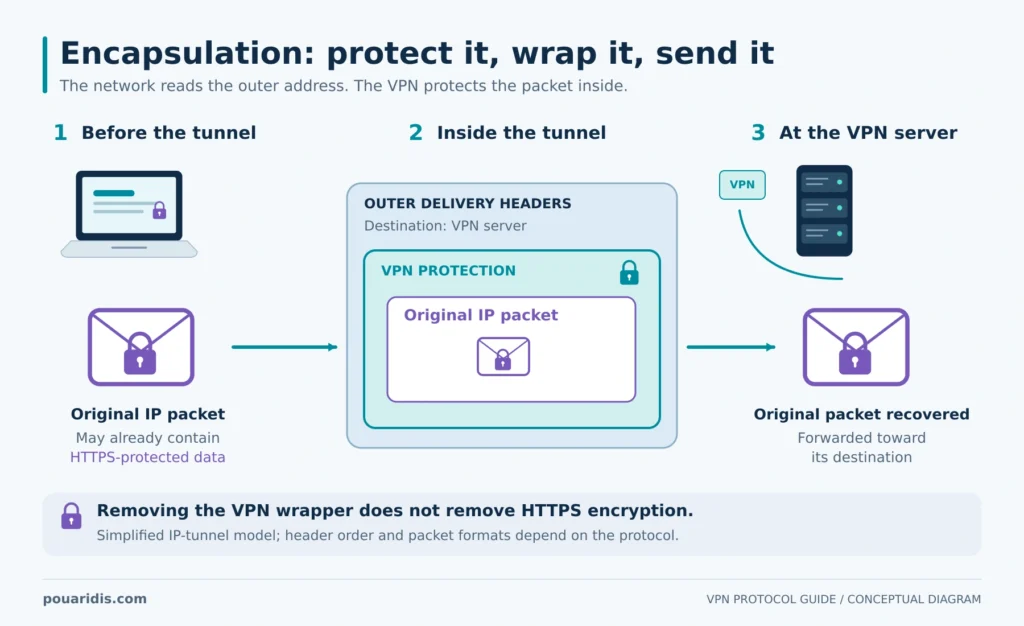
The extra packaging consumes space. If small requests work but larger transfers stall, packet size and path MTU are worth investigating alongside server load and Wi-Fi quality. Changing protocols can help isolate the cause, but it is not a diagnosis on its own.
WireGuard: a sensible first manual choice
WireGuard has a deliberately focused design. Its cryptography includes ChaCha20-Poly1305, Curve25519, and BLAKE2s, rather than offering a long menu of negotiable legacy algorithms. Its handshake provides forward secrecy. The project documents the construction in its protocol and cryptography reference.
For everyday use, I would test WireGuard first. Its efficient design makes it a useful starting point when throughput, responsiveness, and device resources matter. That is a starting recommendation, not a promise that it will win every comparison.
WireGuard also supports roaming: it can update a peer’s endpoint based on correctly authenticated traffic. Switching between Wi-Fi and mobile data is therefore not a reason to assume you must use IKEv2. Actual interruption time still depends on the application, operating system, and network. The WireGuard project overview explains its endpoint and routing model.
Limitation: standard WireGuard transports traffic over UDP and does not include general-purpose traffic obfuscation. Provider options labeled “WireGuard TCP” add their own transport mechanisms; TCP is not a standard WireGuard transport.
Also, WireGuard’s key and tunnel-address model does not establish a provider’s logging policy. Evaluate the service separately instead of treating a protocol label as a privacy audit.
OpenVPN: flexibility and broad configuration options
OpenVPN is useful when you need a configurable tunnel, an existing deployment, or compatibility with equipment that supports it. In TLS mode, it uses TLS for control-channel operations and a separate mechanism for the data channel.
For administrators, that flexibility also creates configuration work. Use maintained software and current configuration guidance instead of copying an old profile simply because it connects. Supported algorithms and settings are not the same as recommended settings.
OpenVPN UDP versus TCP
Start with UDP where it works. TCP transport is a fallback to try when network restrictions prevent a UDP tunnel from connecting. OpenVPN’s own transport guidance makes this distinction.
UDP does not provide transport-level retransmission or ordered delivery. That does not mean a file download becomes randomly corrupted: applications and protocols inside the tunnel retain their own behavior. For example, an inner TCP connection still manages its delivery.
With OpenVPN TCP, an inner TCP connection may run inside an outer TCP connection. Their recovery behavior can interact badly when packets are lost, increasing delays. This is the TCP-over-TCP problem. “TCP is more reliable” is therefore an incomplete explanation of which VPN transport to choose.
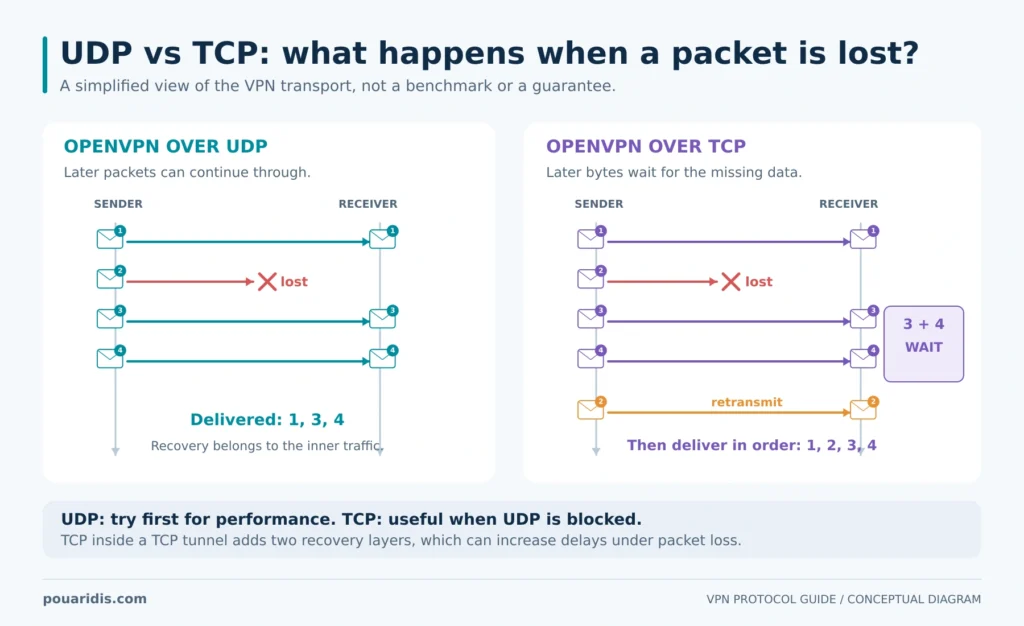
TCP port 443 may help on networks that allow web connections but restrict other ports. However, a port number does not make OpenVPN indistinguishable from HTTPS. Filters can examine traffic characteristics, not just port numbers.
Is OpenVPN always slower than WireGuard?
No fixed ranking applies to every implementation. OpenVPN’s Data Channel Offload documentation describes moving data processing into the kernel to reduce overhead and improve performance. Whether a particular device or service benefits depends on its implementation and configuration.
When comparing protocols, record the device, app version, server location, connection type, and test conditions. A result from an old router is not automatically representative of a modern desktop.
IKEv2/IPsec: useful for mobile and managed connections
IKEv2 and IPsec have different roles. IKEv2 authenticates peers and establishes and maintains security associations; IPsec protects the traffic. That is why the option is commonly written as IKEv2/IPsec. See RFC 7296.
The MOBIKE extension lets a supported IKEv2/IPsec connection update its addresses as network attachment changes. This makes it relevant to devices moving between networks, but the extension must be supported by the client and server.
IKEv2/IPsec normally uses UDP 500 and UDP 4500 for NAT traversal. Networks restricting that traffic can prevent a connection. Its security also depends on authentication, algorithms, and configuration, not just the IKEv2 name.
I would consider it when a provider supports it well on the device, or when an organization already uses a properly managed IPsec deployment. For a personal phone, compare it with WireGuard using the same everyday movement between Wi-Fi and mobile data.
L2TP/IPsec and PPTP: why I would choose something else
L2TP is a tunneling protocol, not an encryption system by itself. Pairing it with IPsec adds protection, but for a new personal VPN setup I would first look for WireGuard, OpenVPN, or IKEv2/IPsec. A legacy requirement may justify keeping an existing deployment while planning its replacement.
PPTP should not be chosen to protect sensitive traffic. Its legacy security weaknesses outweigh the attraction of compatibility or low overhead. A connection being fast and easy to establish does not make it an appropriate security choice.
As a practical sign of the move away from these protocols, Microsoft states that new Windows Server 2025 RRAS installations do not accept PPTP or L2TP connections by default, although administrators can still enable them. That is a default change, not a claim that every existing deployment has stopped working. See Microsoft’s Windows Server 2025 documentation.
Stealth and obfuscation: when connecting is the problem
Encryption protects content. Obfuscation tries to make the connection harder to identify as VPN traffic. You can have strong encryption and still be blocked because the network recognizes the protocol.
Proton describes Stealth as using obfuscated TLS tunneling to help connections work on restrictive networks. It is a provider-specific option, not a universal setting shared by every VPN.
Use it when ordinary options fail or the network appears to filter VPN traffic. Do not assume that a “Stealth” label guarantees invisibility or access through every firewall. If a normal connection already works well, there may be no practical reason to change.
Which protocol should you choose for your situation?

Browsing, streaming, and downloads
Start with automatic mode or try WireGuard manually. Choose an appropriate nearby server before spending time comparing protocols. For streaming, a protocol cannot guarantee access to a particular service or catalog; server availability and the service’s restrictions also matter.
Gaming and video calls
Test latency, jitter, and packet loss, not just download speed. Try WireGuard or OpenVPN UDP first if supported. A VPN can introduce an extra routing step, so do not assume it will lower your ping. Compare the actual game or call experience.
Mobile devices and changing networks
Try the app’s automatic mode, then compare WireGuard with IKEv2/IPsec if both are available. Check what happens when you leave Wi-Fi, return to it, and wake the phone from sleep. A protocol that delivers a high speed-test number but repeatedly interrupts your calls is a poor fit for your use.
Restrictive Wi-Fi
Complete any legitimate captive-portal sign-in first. If the VPN still fails, try automatic mode, a supported TCP option, or obfuscation. If only one server fails, try another before concluding that the protocol is blocked.
Routers and home labs
Check your exact router’s supported protocols and CPU capabilities. Compare throughput on the router itself. A VPN that performs well in a laptop application can behave very differently when the router handles encryption for the whole household.
Security and privacy
Choose a maintained implementation with secure settings, then examine the whole service: its privacy policy, audit scope, account security, DNS handling, and protection during disconnections. No protocol name answers all those questions.
WireGuard vs OpenVPN vs IKEv2: how I would decide
WireGuard versus OpenVPN: test WireGuard first for routine personal use. Choose OpenVPN when an existing deployment, device, or configuration requirement favors it. Keep OpenVPN TCP as a compatibility option where it is available.
WireGuard versus IKEv2: both deserve consideration on mobile devices. Compare real network transitions and app behavior instead of assuming that IKEv2 is automatically better for phones.
OpenVPN versus IKEv2: focus on supported clients, authentication requirements, and network access. An administrator maintaining a fleet has different priorities from someone enabling a VPN on a single laptop.
How to choose a protocol in Proton VPN
Proton’s current protocol instructions recommend leaving Smart Protocol enabled where supported. Smart Protocol is automatic selection, rather than a separate cryptographic tunnel protocol.
- Open the app’s settings and find the protocol option.
- Keep Smart Protocol enabled for normal use, if available.
- For a specific connection problem, select another supported option and reconnect.
- Check the same website, call, or transfer again before changing another setting.
On Windows, the documented path is Settings → Protocol, under Connections. Menus and available choices vary by operating system, app version, and beta features, so use the linked instructions for your device. Do not assume every protocol discussed in this guide is present in every Proton app.
If you want to try Proton VPN, you can view Proton VPN through my affiliate link. Check the current plan details and device support before choosing.
A practical way to test your choice
Change one variable at a time. Otherwise, it is easy to credit a protocol for an improvement that actually came from switching servers.
- Set a baseline. On a trusted network, note normal latency and transfer speed without the VPN.
- Keep conditions similar. Use the same device, network, server location, and test destination.
- Repeat the comparison. Run several tests per option rather than trusting a single peak result.
- Test your real workload. Include a call, stream, game, or large transfer—not only a speed test.
- Check reconnection. Observe recovery after sleep or a network change, and verify the app’s disconnection protection settings.
If every protocol performs badly, investigate the underlying connection, server distance, congestion, or device limits. If only one fails, you have a much narrower problem to troubleshoot.
Frequently asked questions
What is the best VPN protocol in 2026?
For most readers, I recommend the application’s automatic mode or WireGuard as the first manual test. The best choice is the supported option that works consistently on your device and network.
Is WireGuard more secure than OpenVPN?
There is no useful universal winner based on the names alone. WireGuard has a focused cryptographic design; OpenVPN offers more configuration flexibility. Implementation quality, configuration, and maintenance matter for both.
Should I always use OpenVPN TCP because it is reliable?
No. Try UDP first when it works. TCP transport is useful for compatibility, but nesting TCP connections can create performance problems under packet loss.
Does a VPN replace HTTPS?
No. The VPN protects the tunnel to its server; HTTPS separately protects communication with the website. Keep using HTTPS.
Does WireGuard work over TCP?
Standard WireGuard uses UDP. Some providers offer additional transport mechanisms under names such as WireGuard TCP. Those are extensions around the standard protocol.
Will changing protocols fix buffering or a blocked website?
It may help if the current transport is blocked or performs poorly. It will not necessarily fix congestion, a distant server, or a streaming platform’s restrictions.
Should I use Stealth all the time?
Use it when it solves a connection problem, or let your application choose automatically. Obfuscation is not a guarantee of better speed or anonymity.
My recommendation
Start with automatic mode. If you prefer manual control, try WireGuard, keep a compatible alternative available, and judge the result by your actual workload. Use obfuscation when the network blocks ordinary VPN traffic. Avoid PPTP and do not build a new setup around a legacy protocol without a specific compatibility requirement.
The most useful VPN setting is the one you can leave enabled because it connects reliably and performs well enough for what you do.
Explore Proton VPN’s current options (affiliate link).
If you’ve found my post helpful, I’d love it if you bought me a coffee! ☕😊

Sources and further reading
Technical references checked on October 2, 2026. Recommendations and the testing workflow are editorial guidance; no original benchmark results are claimed.
- WireGuard: design, routing, and roaming
- WireGuard: protocol and cryptography
- OpenVPN protocol reference
- OpenVPN: UDP and TCP
- OpenVPN: TCP meltdown
- OpenVPN: Data Channel Offload
- IETF RFC 7296: IKEv2
- IETF RFC 4555: MOBIKE
- Microsoft: Windows Server 2025 and RRAS defaults
- Proton VPN: Stealth
- Proton VPN: current protocol availability and settings
- Proton VPN: protocol overview