
Affiliate disclosure: This article contains affiliate links. If you purchase through one of these links, I may earn a commission at no additional cost to you.
A VPN can change the IP address websites see and protect traffic as it crosses your local network. But where does that protection stop? Can your internet provider still see what you do? And why does HTTPS matter if you already have a VPN?
This guide explains the connection step by step, with practical examples and a clear distinction between what a VPN protects and what remains visible.
How does a VPN work? The quick answer
A virtual private network (VPN) creates an encrypted connection between your device and a VPN server. Traffic routed through that connection travels inside a protected tunnel. The server forwards it toward its destination, so websites generally see the VPN server’s public IP address instead of your home or mobile connection’s address.
The VPN tunnel ends at the VPN server. HTTPS provides a separate layer of encryption between your browser and the website. Using both gives you protection over different parts of the journey.
The examples below assume a correctly configured, full-tunnel VPN on your device, with DNS routed through it and no traffic leaks. Split tunneling and router-based setups change that picture.
Your internet connection without a VPN
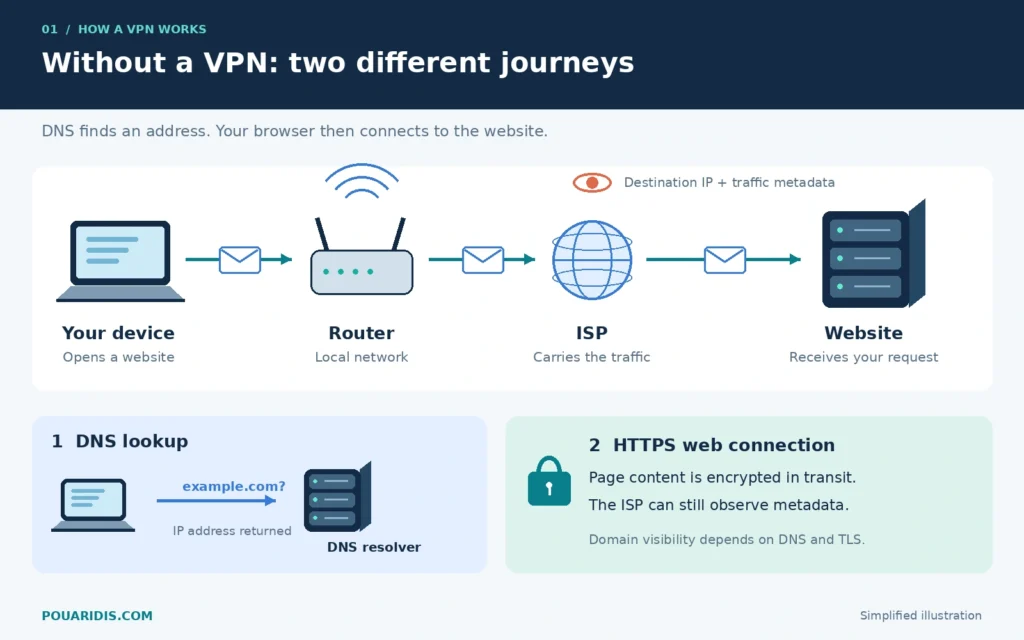
When you open a website, your browser needs an address to connect to. If it does not already have the answer cached, it uses DNS—the system that translates domain names into IP addresses.
Your device then sends traffic through your router, your internet service provider (ISP), and other networks toward the website. A phone using mobile data goes through the mobile operator instead of your home router.
DNS is a lookup, not a mandatory stop that every web packet passes through. Your resolver might belong to your ISP, a public DNS service, your employer, or another provider.
What can your ISP see?
Your ISP knows which subscriber connection is sending traffic. It can observe destination IP addresses, timing, and data volumes. It may also see domain names through unencrypted DNS or exposed TLS connection information.
That does not mean it can read every page you open. With correctly functioning HTTPS, page contents, passwords, form submissions, and the path after the domain in a URL are encrypted in transit.
Encrypted DNS reduces DNS visibility, and Encrypted Client Hello can protect information in the TLS handshake where supported. Destination IP addresses remain visible without a VPN, but a shared IP address does not necessarily identify one specific website. See the DNS over HTTPS specification and Encrypted Client Hello specification.
What can a website see?
The website receives a connection from your public IP address. IP-based location estimates are approximate; they do not automatically reveal your street address.
The website can also see the information you send it: requested pages, searches, submitted forms, and account activity. HTTPS protects that information during transit; the website itself must still receive it.
What changes when you connect to a VPN?
Your VPN app establishes an encrypted session with a VPN server and configures routing for the traffic it should carry. For a typical full-tunnel connection, internet-bound traffic goes through that server.
Your router and ISP still transport the packets. The VPN does not replace your internet connection. What changes is the outer destination they see: the VPN server rather than each website reached through the tunnel.
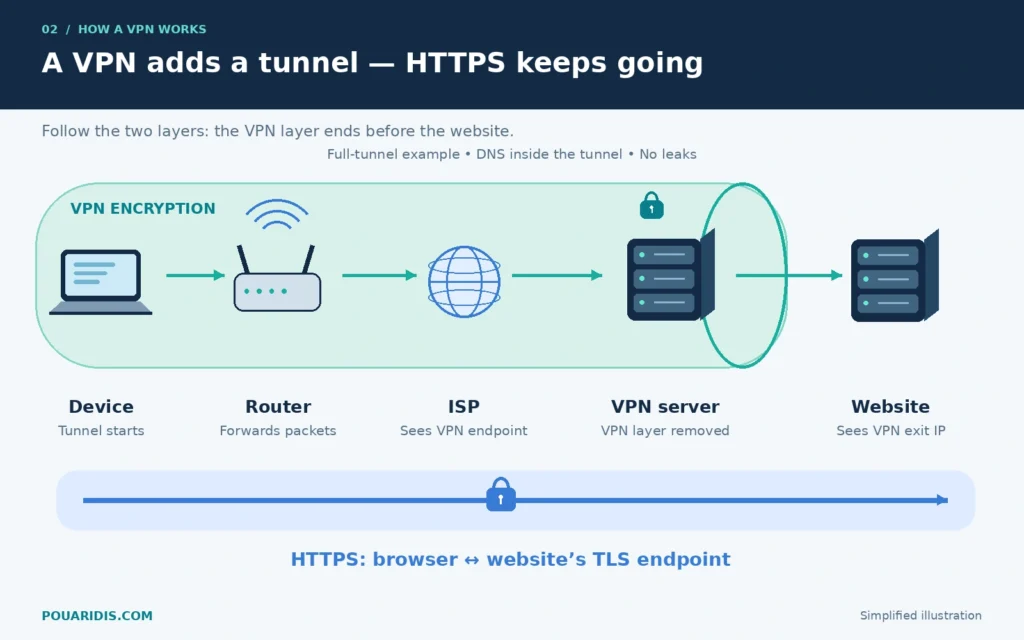
Consider a laptop on hotel Wi-Fi opening an HTTPS website. The hotel network carries encrypted VPN traffic to the VPN server. The server removes the VPN layer and forwards the connection. The website receives traffic from the VPN exit address, while HTTPS continues to protect the web content.
For another introductory explanation, see Proton’s overview of how a VPN works.
Want to try this yourself? Explore Proton VPN through my affiliate link. Connect to a server and compare your public IP address before and after connecting.
Inside a VPN tunnel: what happens to a packet?
A tunnel is a useful metaphor for encapsulation: carrying one packet inside another protected structure.
In a simplified tunnel-mode example:
- Your device creates an IP packet addressed to the destination service.
- The VPN encrypts the inner packet and adds the information needed to transport it to the VPN server.
- Your ISP forwards the outer packet using the VPN server’s address.
- The server verifies and decrypts the VPN-protected data, then forwards the inner traffic.
- Return traffic travels back through the tunnel to your device.
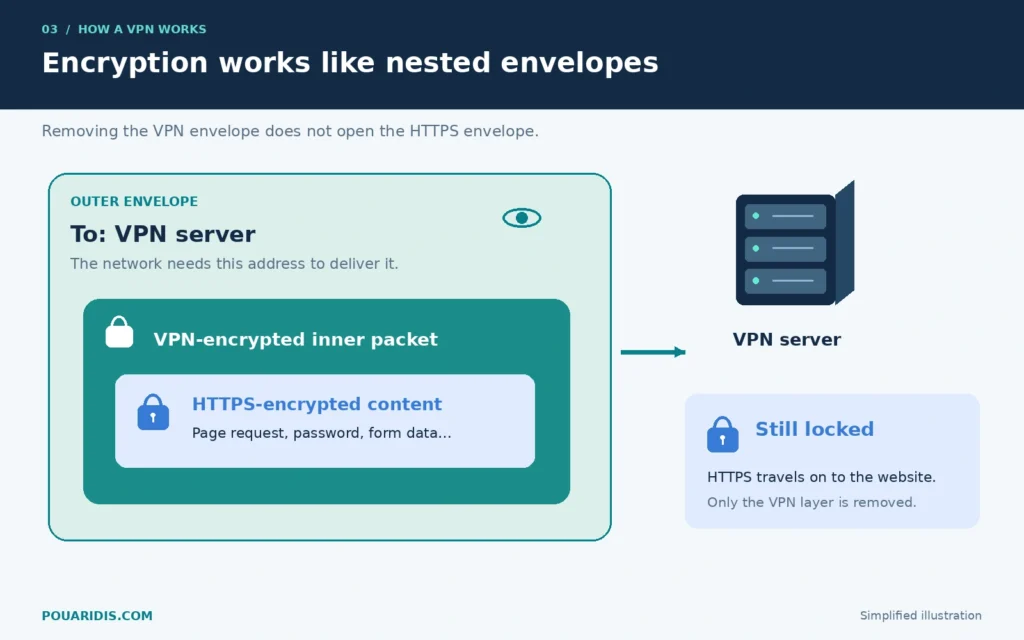
The precise headers differ between protocols. The IPsec ESP specification describes one standardized approach to protecting packets, including tunnel mode.
For HTTPS traffic, removing the VPN layer does not turn the enclosed web content into readable text. That content is still protected by TLS until it reaches the website’s TLS endpoint.
How encryption is established
A VPN protocol defines how the endpoints authenticate, establish keys, and protect traffic. Modern designs use authenticated encryption so recipients can also detect tampering.
For example, WireGuard uses a handshake to establish session keys and protects data using ChaCha20-Poly1305. Its protocol documentation explains the cryptography and key rotation. You do not need to choose these algorithms manually in a normal consumer VPN app.
VPN vs HTTPS: why you want both
These technologies protect different connections:
| Protection | Starts at | Ends at | Main purpose |
|---|---|---|---|
| Device-based VPN tunnel | Your VPN app | VPN server | Protect routed traffic across the intervening network |
| HTTPS | Your browser | Website’s TLS endpoint | Protect web content in transit and authenticate the server |
With HTTPS, a VPN provider normally cannot read your passwords or page contents merely by forwarding the connection. This assumes a trustworthy device and valid certificate checks, without an installed interception certificate or compromised endpoint.
With plain HTTP, the VPN only protects the journey as far as its server. Readable HTTP content can then be exposed to the VPN operator and networks beyond it.
Keep HTTPS enabled and take certificate warnings seriously. An HTTPS connection also does not prove that a business is honest: a phishing site can use HTTPS. Mozilla’s TLS explanation and the TLS 1.3 specification cover the underlying protection.
Who can see what when you use a VPN?
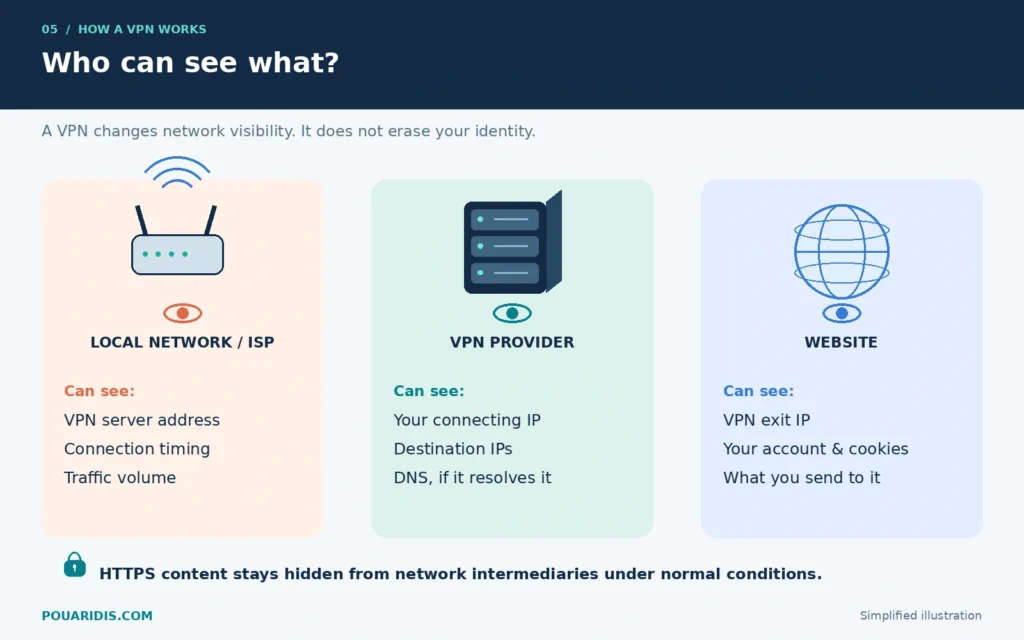
The following table assumes HTTPS, a full-tunnel VPN, and no leaks. “Can see” describes technical visibility, not a claim that every provider records the information.
| Observer | Information generally visible | Information normally hidden from that observer |
|---|---|---|
| Local network / ISP | Your connection, VPN server IP, timing and traffic volume | Inner destination IPs, DNS carried inside the tunnel, HTTPS content |
| VPN provider | Your connecting IP, destination IPs, traffic metadata; DNS queries if it resolves them | HTTPS page contents, passwords and form data |
| Website | VPN exit IP, requests you send, account activity, cookies and browser signals | Your original connection IP, assuming no bypasses or leaks |
| DNS resolver | Names submitted to it and the source of those queries | HTTPS page contents and URL paths |
A VPN changes whom you trust with parts of your connection. Read privacy policies, look for meaningful security audits, and consider who operates the service. “No logs” concerns retention; it does not mean the server has no technical visibility while forwarding traffic. The EFF’s VPN selection guide is useful background.
Traffic analysis is another limitation: encryption hides content, but timing and packet sizes remain observable. Researchers have studied website fingerprinting over encrypted connections. A consumer VPN should not be treated as a guarantee against a powerful observer correlating traffic.
DNS and VPNs: avoiding a side door
A VPN app will often configure DNS for the tunnel, but DNS handling depends on the app, operating system, and browser settings.
A DNS leak occurs when lookups take an unintended route outside the VPN. Browsing traffic might use the tunnel while domain lookups still reach the local network’s resolver.
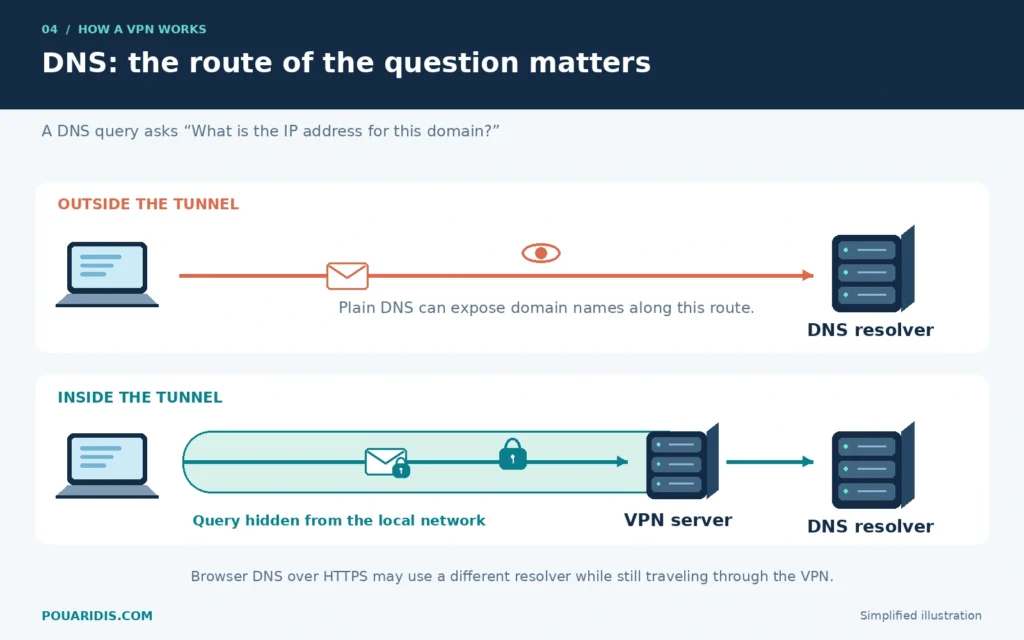
Browser-based DNS over HTTPS introduces another possibility: your browser may use its own resolver. If that connection goes through the VPN, using a different DNS provider is not automatically a tunnel leak. It does mean another provider handles those lookups, and provider-specific DNS filtering may not apply.
Check the VPN’s guidance before overriding DNS settings. A DNS test is useful evidence, but the resolver name alone does not prove the route taken or guarantee that all traffic is protected. Proton’s DNS leak documentation discusses common configuration issues.
Does a VPN make you anonymous?
No. Changing your IP address does not erase your identity.
If you sign in to a shopping account, that shop can still associate activity with your account. Cookies can reconnect browsing sessions, and browser fingerprinting can combine device characteristics to recognize a browser. Mozilla explains fingerprinting here.
A VPN also cannot undo personal information you submit. Nor does it automatically prevent malicious downloads or protect passwords entered into a fraudulent form. Some services offer separate filtering features, but these are additional tools with their own limitations.
Use a VPN alongside updates, strong unique passwords, multifactor authentication, and careful attention to the sites you visit. As the EFF explains in its discussion of VPN limitations, a VPN is one tool within a broader privacy setup.
VPN protocols, briefly explained
A protocol is the method used to build the connection. It is separate from the provider selling the service.
| Protocol or approach | Practical role |
|---|---|
| WireGuard | A modern VPN protocol designed for simplicity and efficient performance; a sensible starting point when available |
| OpenVPN | A flexible, established option supporting UDP and TCP transports |
| IKEv2/IPsec | IKEv2 negotiates security associations; IPsec protects the traffic |
| Obfuscation / Stealth | Attempts to make VPN traffic harder to identify or block on restrictive networks |
WireGuard’s documentation, the OpenVPN how-to, and the IKEv2 standard explain these designs. Proton’s Stealth overview describes its obfuscation approach; availability depends on the app and platform.
For most readers, starting with the app’s automatic selection is more useful than chasing a universal “best” protocol. If a network blocks the connection, try the provider’s recommended alternative. Obfuscation is not a guarantee of access or invisibility.
What happens if the VPN disconnects?
Without protective rules, your device may resume direct internet access after a tunnel fails. New connections can then reveal your normal public IP address.
A kill switch is designed to block traffic when the VPN drops. Some modes protect only unexpected disconnections; stricter modes block internet access whenever the VPN is disconnected, including after a restart.
Check how your particular app behaves. Proton’s kill-switch instructions document platform differences and known limitations, including some Apple-service DNS exceptions. Test reconnections and network changes rather than assuming a single toggle covers every situation.
Does a VPN slow down your internet?
It can. Packets take a different route, encryption adds processing work, and the VPN server can become a bottleneck. Distance matters particularly for latency, which affects calls and games.
A nearby server is a reasonable first choice. Compare the same activity with and without the VPN, then try another nearby server if performance is poor. There is no reliable universal percentage for the slowdown: network conditions, hardware, protocol, and server load all matter.
A different route can occasionally perform better, but a VPN does not create bandwidth your access connection lacks. Avoid choosing a service based only on a headline speed claim.
When should you use a VPN?
Start with the problem you want to solve:
- Less visibility for the local network: route traffic through a trusted VPN when using shared or unfamiliar internet access. HTTPS already provides substantial web-content protection.
- A different public exit address: connect through a provider’s server. Services may still recognize you through account or browser information.
- Private access to home resources: connect to a VPN server you control at home.
- Several devices while traveling: consider a router configured to carry their traffic through a VPN.
These last two cases deserve a distinction. A home VPN can give you remote access to your LAN; internet traffic only exits at home if your routing configuration sends it there. It is not automatically equivalent to a commercial privacy service. For a hands-on example, follow my UniFi WireGuard setup guide for the UDM-Pro.
If you prefer a travel-router setup, my GL.iNet GL-BE3600 review covers that hardware approach. When the router runs the VPN, the VPN layer starts at the router, so your device-to-router connection still needs appropriate protection.
Watch for split tunneling
Split tunneling deliberately sends selected apps or destinations outside the tunnel. It can be useful, but those exclusions do not receive the VPN’s protection. Always consider the route of the specific traffic you care about, rather than only whether the app says “connected.”
Frequently asked questions
Can my ISP tell that I am using a VPN?
Often, yes. It can see the server you connect to and characteristics of the connection. Hiding the content of tunneled traffic is different from hiding VPN use.
Does a VPN change my GPS location?
It changes the IP address seen by services reached through the tunnel. It does not itself rewrite your phone’s GPS coordinates. Apps with location permission can receive location information independently.
Does a VPN work on mobile data?
Yes. The tunnel can run over a cellular connection, but your mobile operator still carries the traffic and counts data usage. Watch what happens when your phone switches between Wi-Fi and mobile data.
Does a VPN protect every device on my Wi-Fi?
An app on your laptop generally covers that laptop’s routed traffic. Other devices need their own VPN connections or a router configured to route their traffic through a VPN.
Do I still need HTTPS?
Yes. The VPN tunnel ends at its server. HTTPS continues protecting web content between your browser and the website.
Try it with a clear goal
For an initial test, choose a nearby server, confirm that your public IP changes, review DNS behavior, and enable the appropriate kill-switch mode. Keep HTTPS enabled and remember that logging in still identifies you to that service.
If you want more background on the provider, read my Proton VPN overview. That post was published in 2025, so check the provider’s current plan details before purchasing.
Ready to test it on your own connection? Try Proton VPN using my affiliate link. If you purchase through it, I may earn a commission at no additional cost to you.
If you’ve found my post helpful, I’d love it if you bought me a coffee! ☕😊
